Narrative Reconstruction, Stitching Together the Full Story Using LLMs
- Ai , Knowledge graphs , Python
- July 4, 2025
If you follow news online, especially from sources like Online Khabar, you know the drill. A big story, a political investigation, a natural disaster, a major development project, doesn’t fit in one article. Instead, it unfolds over days, weeks or months in separate reports: “New Witness in Case,” “Committee Grills Official,” “Court Hearing Postponed.” As a reader, it’s frustrating. You’re left with puzzle pieces scattered across time, trying to remember who said what, when it happened, and how it all connects.
Quote
What if you could press a button and get the complete story, all the events stitched together in order, with all the key players and places clearly mapped?
That’s exactly what Narrative Reconstruction tries to do, using LLMs to automatically build a single, coherent narrative from many separate news articles. Here’s how it works.
Step 1: Finding All the Relevant Articles
We don’t scrape entire websites blindly. First, we need to find only the articles about our topic (e.g., “Gold Smuggling Investigation”), for this we use:
Targeted Search: We use a SERP (Search Engine Results Page) API. Think of it as programmatically doing a Google search. We give it a command like:
site:onlinekhabar.com "Gold Smuggling Investigation"
This limits the search results to just that site and topic.
Collecting URLs: The API returns a list of relevant article links from that site. We now have our target list.
Step 2: Extracting the Raw Story from Each Page
Now, we fetch each article’s HTML, the raw code of the webpage.
DOM Parsing: We can use libraries like BeautifulSoup or Cheerio to navigate this HTML like a map. It lets us find and extract specific parts of the page.
Building a Specialized Parser: News sites have unique layouts. For this demo, we built a custom Online Khabar Parser. It knows exactly where in Online Khabar’s HTML to find the title, the main text content, the published date, and the author. This gives us clean, structured data from each article.
Step 3: Teaching the AI to Read & Understand
With all the article text gathered, we send each one to Google’s Gemini LLM with specific instructions or prompts to extract structured facts. For this we define a clear schema for the AI to follow:
event_extraction_schema = {
    'title': 'Event Extraction Schema',
    'type': 'array',
    'items': {
        'type': 'object',
        'properties': {
            'event': {'type': 'string', 'description': 'Short title or label for the event'},
            'actors': {'type': 'array', 'items': {'type': 'string'}, 'description': 'People, organizations, or groups directly involved in the event. Do not include generic terms, and actors that do not play a significant role in the event should be excluded.'},
            'event_date': {'type': 'string', 'format': 'YYYY-MM-DD', 'description': 'date of the event occurence, use the published date as a reference for constructing the date if not explicitly mentioned'},
            'event_time': {'type': ['string', 'null'], 'description': 'time in 24-hour format, or null if unknown'},
            'location': {'type': 'array', 'items': {'type': 'string'}, 'description': 'List of places associated with the event.'},
            'details': {'type': 'string', 'description': 'A short summary of the event, including role of actors, location, and other relevant details'},
        },
        'required': ['event', 'actors', 'event_date', 'details', 'location'],
    },
}
Gemini acts as a reader, pulling out these structured facts from the messy text, albeit a bit slow and it does require careful prompting to get accurate results.
Step 4: Consolidation, Making Sense of the Spaghetti
This is the crucial part. The raw extracts are messy. Different articles refer to the same people, places, and events in different ways. We need to clean this up.
Actor Canonicalization: The “Police Superintendent Ram Bahadur Gurung” in article 1 might be called “SP Gurung” in article 2 and “the senior police official” in article 3. Our system creates a master mapping for each real-world entity, listing all its aliases under one canonical name (e.g., Ram_Bahadur_Gurung).
Location Canonicalization: We do the same for places. “KTM Airport” and “TIA” get linked to the canonical Tribhuvan_International_Airport.
Event Tagging: We then identify unique events, group and resummarize reportings of the same event across all articles. Each event gets a unique ID, is tagged with its date, and its actors/locations are swapped out for their canonical versions. This links every mention back to the same real-world person, place, or happening.
Step 5: Weaving the Final Narrative & Visualizing It
Now we have a clean, de-duplicated database of facts.
The Story: We ask Gemini again: “Using this consolidated timeline of canonical events, write a clear, concise narrative summarizing the entire story from beginning to end.” The result is a single, flowing text that makes sense.
The Graph: We export our database of canonical actors, events, and locations into a Knowledge Graph. Tools like Neo4j or Gephi can then visualize it.
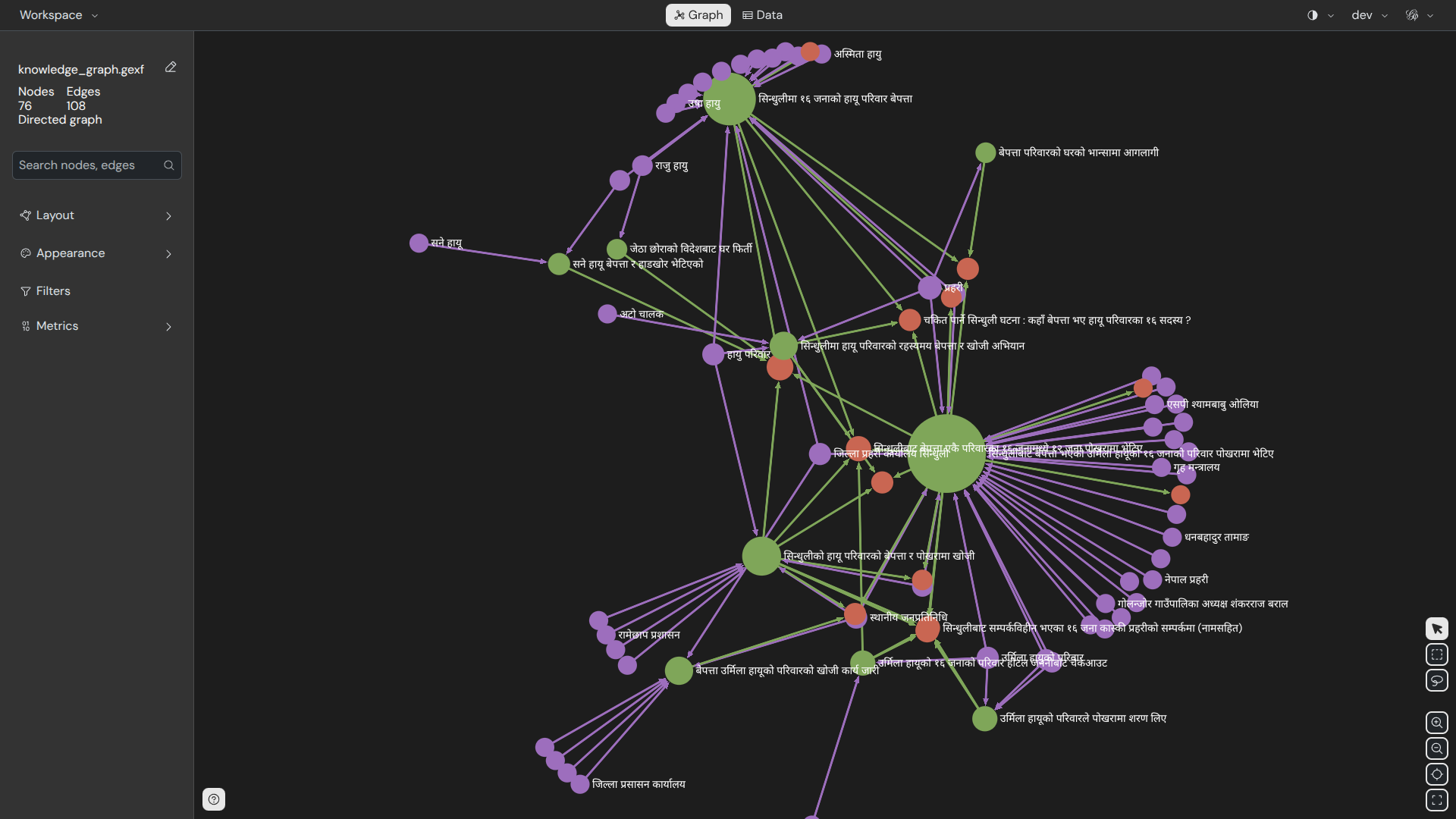
If you want to play around with the graph yourself, you can download this dataset here, then simply load the JSON file into Gephi Lite, in your browser.
The Timeline Visualization: We can plot these events on a visual timeline as well. The final result? An interactive diagram where you can see the story unfold over time and click on any person or place to see their role in the entire saga.
Voilà! What started as a frustrating hunt across countless tabs is now a coherent story and an explorable map. This can be a useful tool to fight information overload and help everyone understand the complex stories that shape our world.
You can find the code for this project on my GitHub.